# 403 Forbidden in Python requests: which bot wall sent it
*Originally published at [https://lurkapi.com/blog/scraper-403-forbidden](https://lurkapi.com/blog/scraper-403-forbidden)*

If Chrome opens a page and your Python script gets 403 Forbidden, it’s usually a bot wall in front of the site that refused you: Cloudflare, DataDome, Akamai, PerimeterX or AWS WAF. Walls judge how your client connects (the TLS handshake, the HTTP version and its settings, the order of your headers) and compare that with the name in your User-Agent. `requests` gets every one of those wrong for a browser, which is why pasting in Chrome’s User-Agent so rarely helps.
The 403 also says which wall sent it and whether it’s a block or a challenge, and each has a different fix.
## Send Chrome’s handshake, not just its User-Agent
`requests` introduces itself as `python-requests/` plus a version number, so swapping the User-Agent feels like the obvious fix. Put Chrome’s User-Agent on a plain HTTP client, though, and Kickstarter and Priceline still answer 403 with the same block page as before. The rest of the request still says “script”: `requests` negotiates TLS through OpenSSL with its own ciphers and extensions, and it only speaks HTTP/1.1, where Chrome talks to these sites over HTTP/2. Cloudflare calls the result a [JA3 or JA4 fingerprint](https://developers.cloudflare.com/bots/additional-configurations/ja3-ja4-fingerprint/), and a Chrome name over a non-Chrome fingerprint is an easy catch.
[](https://media.lurkapi.com/blog/scraper-403-forbidden/user-agent-vs-handshake.mp4)
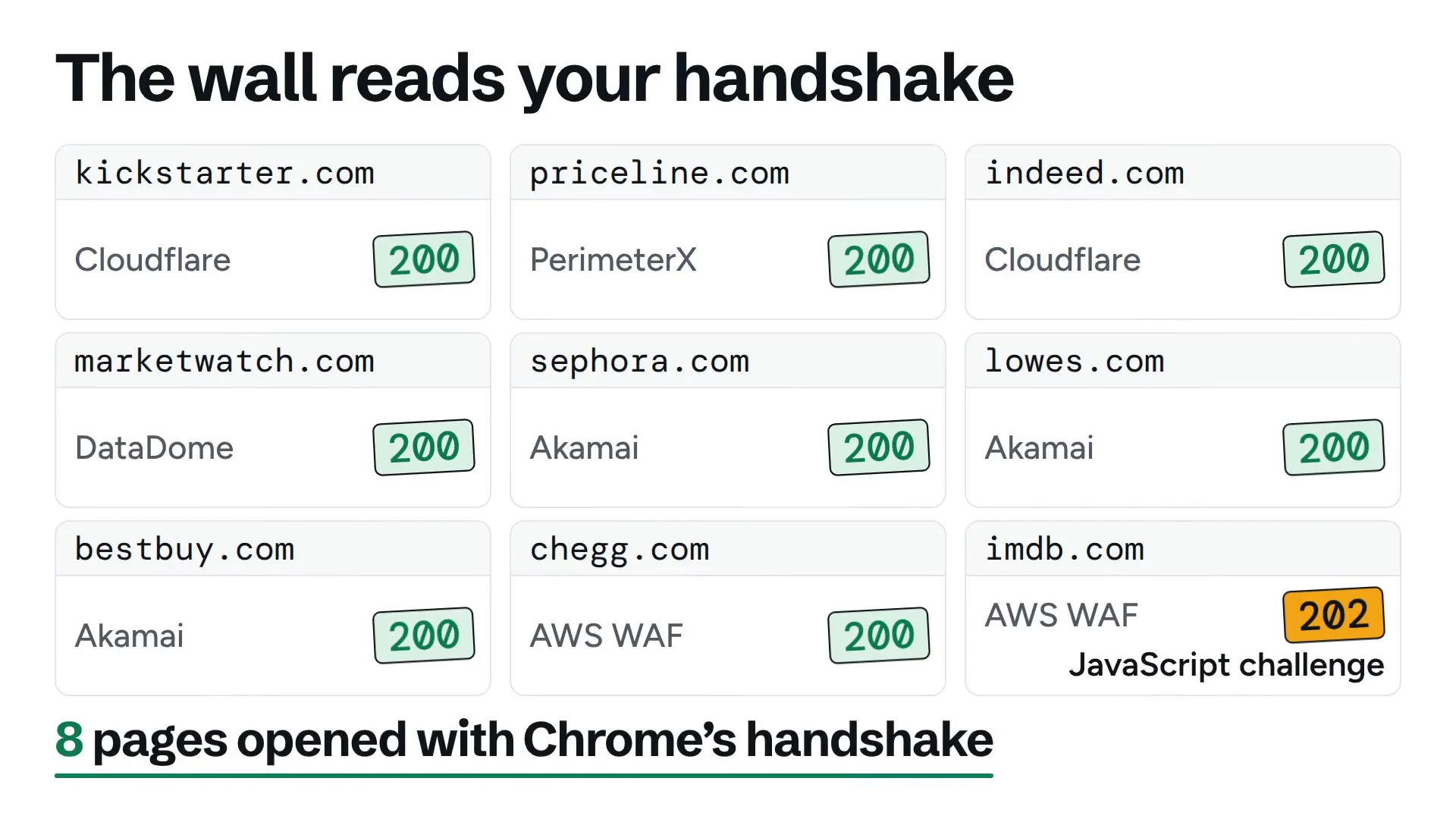
*The same request three ways. Chrome’s User-Agent alone still gets a 403 from Kickstarter and Priceline; Chrome’s handshake gets both pages and six more, and IMDb answers it with a JavaScript challenge (a 202).*
Send the same request with Chrome’s handshake, HTTP/2 settings and header order, and both pages load, and so do six more walled sites. In Python, [curl\_cffi](https://github.com/lexiforest/curl_cffi) gives you that handshake with one argument:
**curl\_cffi** · Python
```python
from curl_cffi import requests
r = requests.get(url,
impersonate="chrome")
```
## Read the 403: each wall signs its response
Each vendor marks its response:
| Wall | Look for | What it is |
| --- | --- | --- |
| Cloudflare | `cf-mitigated: challenge` and a “Just a moment...” page. Without that header, `server: cloudflare` and `cf-ray` over a 403 page (error 1020, or the site’s own) | A challenge with the header, a block without it |
| DataDome | `x-datadome-cid` header, `datadome` cookie, a page of about 780 bytes that loads `captcha-delivery.com` | A block, often sent as a 401 |
| Akamai | `server: AkamaiGHost`, an “Access Denied” page with “Reference #18…” | A block, sometimes sent with a 200 |
| PerimeterX (HUMAN) | `_pxhd` cookie, `window._pxAppId` and `px-captcha` in the page, “Press & Hold” | A block page with a press-and-hold challenge |
| AWS WAF | `x-amzn-waf-action: challenge` on a 202. On CloudFront, a 403 that says “Request blocked.” | A challenge (202), captcha (405) or block (403) |
| No vendor marks | A bare “403 Forbidden” with no vendor headers or cookies | An IP or User-Agent rule, or the site itself |
*Check the headers first, then the cookies, then the page. The first match names the wall.*
Don’t read `server: cloudflare` as a Cloudflare block: Priceline’s 403 travels through Cloudflare, but the page is PerimeterX’s. And Akamai’s `_abck` and `bm_sz` cookies show up on pages that load fine; they mean Akamai is there, not that you’re blocked.
To check in code, pass the status, headers and body to this function. It looks for the challenge headers and Akamai’s page before it looks at the status, because those can arrive with a 202 or even a 200.
**which\_wall()** · Python
```python
import re
import requests
AKAMAI_PAGE = re.compile(
r"errors\.edgesuite\.net|Reference #18")
def which_wall(status, headers, body):
h = {k.lower(): v for k, v in headers.items()}
via = h.get("via", "").lower()
if h.get("cf-mitigated") == "challenge":
return "Cloudflare challenge"
if h.get("x-amzn-waf-action"):
return f"AWS WAF {h['x-amzn-waf-action']}"
if AKAMAI_PAGE.search(body):
return "Akamai block"
if status not in (401, 403, 429, 503):
return None
if "x-datadome-cid" in h or "captcha-delivery.com" in body:
return "DataDome block"
if "px-captcha" in body or "_pxAppId" in body:
return "PerimeterX block"
if h.get("server", "").lower() == "akamaighost":
return "Akamai block"
if "cf-ray" in h:
return f"Cloudflare {status}"
if "Request blocked" in body and "cloudfront" in via:
return "AWS WAF block"
return f"Unbranded {status}"
r = requests.get(url) # your request
print(r.status_code, which_wall(r.status_code, r.headers, r.text))
```
In axios, a 403 throws `AxiosError: Request failed with status code 403`, and the same three inputs are `err.response.status`, `err.response.headers` and `err.response.data`.
**What each wall’s block page looks like**
**kickstarter.com** · Cloudflare challenge
```text
HTTP/2 403
server: cloudflare
cf-mitigated: challenge
cf-ray: a480d8d37e259aac-IAD
set-cookie: __cf_bm=…
Just a moment...
```
**sephora.com** · Akamai
```text
HTTP/2 403
server: AkamaiGHost
akamai-grn: 0.c424c317.1791585316.3a9f823
Access Denied
Access Denied
You don't have permission to access "http://www.sephora.com/"
on this server.
```
**priceline.com** · PerimeterX through Cloudflare
```text
HTTP/2 403
server: cloudflare
cf-cache-status: DYNAMIC
set-cookie: _pxhd=…
Access to this page has been denied
window._pxAppId = 'PX9aTjSd0n';
script.src = 'https://captcha.px-cloud.net/PX9aTjSd0n/captcha.js?…';
Press & Hold to confirm you are a human (and not a bot).
```
**imdb.com** · AWS WAF challenge, as a 202
```text
HTTP/2 202
x-amzn-waf-action: challenge
via: 1.1 ….cloudfront.net (CloudFront)
window.gokuProps = { "key":"…", "iv":"…", "context":"…" };
AwsWafIntegration.getToken().then(() => { window.location.reload(true); });
```
## Some blocks don’t look like errors
`raise_for_status()` only fires on a 4xx or 5xx, and axios only throws outside 2xx. Walls don’t always answer that way:
- Lowe’s sends Akamai’s Access Denied page with a 200. A scraper that trusts the status saves the block page as data.
- IMDb’s AWS WAF challenge, which it sends once your handshake looks like Chrome’s, comes back as a 202. Both libraries treat that as success.
- MarketWatch’s DataDome block is a 401, which reads like a login problem.
- Best Buy doesn’t answer at all. It drops the connection, so you get a connection error instead of a 403.
- Kickstarter gives Chrome’s handshake a 200, but its homepage is a JavaScript app: the content appears only once a browser runs it.
So run the check on every response before you parse it, 200s included, and always set a timeout.
## A block needs a better client, a challenge needs a browser
A block refuses your client or your IP. Fix the client first with Chrome’s handshake. If the block survives that, the wall is judging your IP (DataDome scores IP reputation alongside the client), and the fix is a different network.
A challenge is a page that runs JavaScript to check that a browser is there. A good handshake often avoids it: Kickstarter challenges a plain client and serves Chrome’s handshake the page. When the challenge comes anyway, as IMDb’s does, only a browser that runs the script gets through, which means Playwright or Puppeteer and a Chrome to keep running.
## Or let one call climb for you
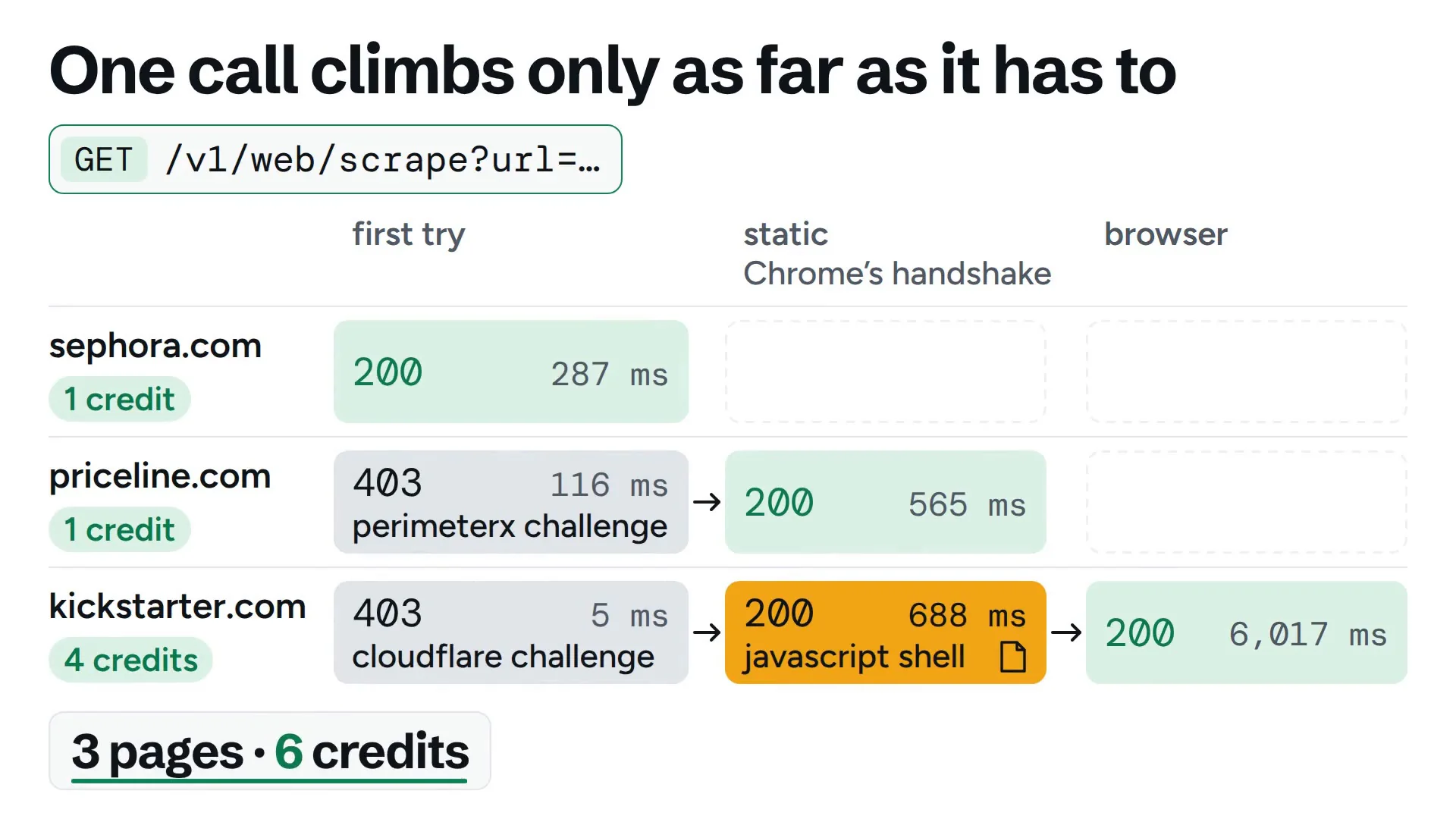
LurkAPI’s scrape endpoint climbs that ladder for you: a quick direct request, then Chrome’s handshake from a static ISP IP, then a browser, then other networks for walls that judge the IP. It stops at the first step that gets the page and charges for that step: 1 credit up to the browser, and more only for the other networks. A call that every step fails costs nothing.
[](https://media.lurkapi.com/blog/scraper-403-forbidden/scrape-climbs.mp4)
*Three URLs, one endpoint. Sephora opens on the first, cheapest step and Priceline on Chrome’s handshake (1 credit each); Chrome’s handshake gets only Kickstarter’s JavaScript shell, so it goes on to the browser (1 credit). 3 credits for the three pages.*
Priceline needed one step up:
**Scrape Priceline’s homepage** · 1 credit
```bash
curl -G "https://api.lurkapi.com/v1/web/scrape" \
--data-urlencode "url=https://www.priceline.com/" \
-d format=markdown \
-H "x-api-key: $LURK_KEY"
```
**Response** · trimmed
```json
{
"success": true,
"credits_charged": 1,
"status": 200,
"url": "https://www.priceline.com/",
"content": "Skip to main content\n…\n- [Hotels](https://www.priceline.com/hotels)\n- [Cars](…",
"via": "static",
"attempts": [
{ "via": "direct", "ms": 116, "status": 403,
"wall": "perimeterx challenge" },
{ "via": "static", "ms": 565, "status": 200,
"wall": null }
],
"billing": { "mode": "auto", "credits": 1,
"breakdown": { "base": 1 } }
}
```
`attempts` lists every step and the wall it met, in plain labels like `perimeterx challenge` or `datadome block`, so you can see why a page cost what it did.
Kickstarter went one step further: Chrome’s handshake got a 200, the endpoint saw a page that JavaScript still had to build, and the browser came back with the full page in about 7 seconds for 1 credit. Most pages take 1 to 3 seconds and browser renders 5 to 15, so give the call a 90-second timeout for the slow ones. The [web scraping guide](https://lurkapi.com/docs/web-scraping) lists every step and its price.
Paste the URL that’s giving you the 403 and see which step gets it:
[Run GET /v1/web/scrape in the live playground](https://lurkapi.com/docs/web/scrape)
## Questions
**Why do I get 403 Forbidden with Python requests but not in the browser?**
A bot wall in front of the site saw a client that isn’t a browser. The User-Agent says python-requests, and the TLS handshake and HTTP version don’t match Chrome’s. The response’s headers, cookies or page say which wall it was.
**AxiosError: Request failed with status code 403**
Axios throws on any status outside 2xx. Read err.response.headers and err.response.data to see who sent it. On a page Chrome opens fine, it’s usually a bot wall reacting to the axios/ User-Agent and Node’s non-browser handshake; on an API URL, usually a missing or wrong token.
**Does changing the User-Agent fix a 403?**
Rarely, on a site behind a bot wall. Kickstarter and Priceline still answer 403 to a plain client sending Chrome’s User-Agent, and serve the page once the request also has Chrome’s TLS handshake and HTTP/2 settings.
**What is cf-mitigated: challenge?**
A Cloudflare response header that marks a challenge page. The page clears only in a browser that runs Cloudflare’s JavaScript, which then gets a cf\_clearance cookie.
**How do I tell if a site uses PerimeterX?**
Look for a \_pxhd or \_px3 cookie, window.\_pxAppId in the HTML, or a “Press & Hold” page that loads from px-cloud.net. PerimeterX is now called HUMAN.